TecCom Business Cloud enables Buyers to access and explore article data directly from connected suppliers.
Buyers can use TecCom Portal or integrate via API to automate access to article assortments and product information.

¶ Activation in TecCom Portal
As a Buyer Administrator, you can enable Business Cloud Article Data in your Organization Details.
To activate the service:
- Log in to TecCom Portal
- Go to Administration → Organization
- Select your Buyer organization
- Enable Business Cloud Article Data
- Save your configuration
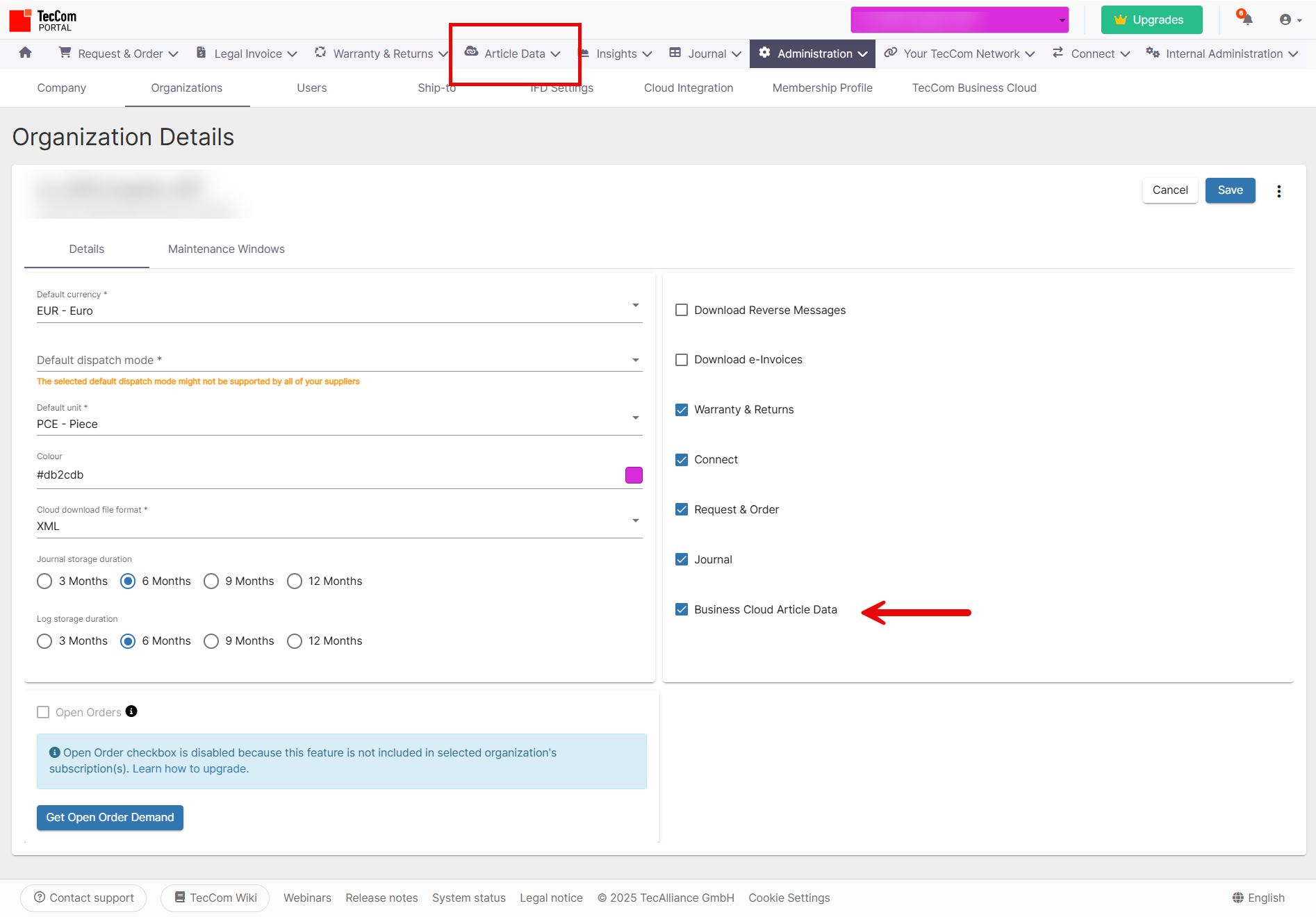
After saving, the Article Data menu will be available in TecCom Portal.
¶ Using Article Data in the Portal
In the Article Data menu, Buyers can:
- See all suppliers offering article data to their Buyer
- Browse assortments (up to 200 articles per page)
- Search for specific articles within a supplier’s assortment
- View complete article details including brand, description, and product references
This option is useful for Buyers who want to manually explore or verify data before setting up integrations.
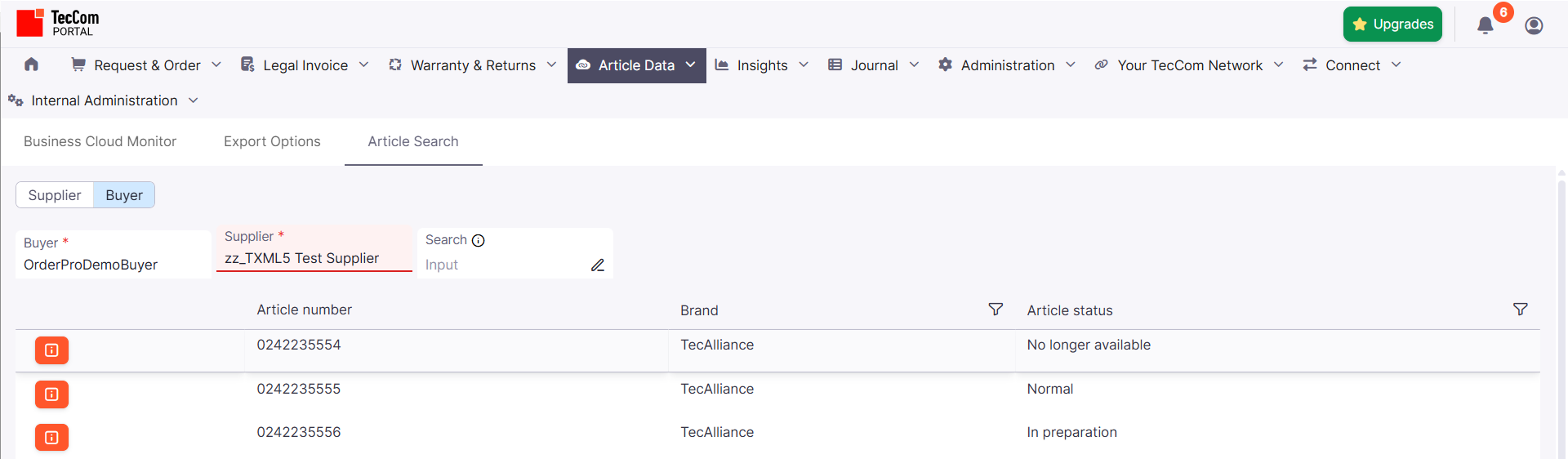
Buyer can refine the research using the Search box. The research is done using the Article Number value (or part of it).
At least 3 characters are required in the Search field. Spaces and special characters are removed for the search.
¶ Using Article Search Data API
Buyers can also access article data programmatically through the TecCom Business Cloud Data API.
This enables system integration, automation, or synchronization with ERP systems.
 TecCom Business Cloud – Data API Documentation
With this API you can:
- Retrieve all suppliers connected to your Buyer
- Access the full assortment of a selected supplier (200 products per page)
- Search for a specific article by identifier
- Search a batch of articles by identifiers
- Retrieve detailed article information
Resources:
 TecCom Business Cloud Postman Collection
- Postman Environment (available via TecAlliance Consultant)
- Example Supplier:
zz_TXML5 Test Supplier(Test Supplier)
¶ Batch lookup
Endpoint: POST /suppliers/{SellerTecID}/articles/batch-lookup
Use this endpoint to search articles by any of the next identifiers: 'Erp', 'Ean’, ‘TecDoc', ‘AcesPies' or 'BuyerArticleNumber'.
¶ Request
It's POST request that has the next body structure:
{
    "requests": [
    {
      "correlationId": "some id", //used to link a request to a response
      "identifier": "Ean", //one of the identifiers
      "brand": "some brand", //brand name
      "articleNumber": "some article number" //article number
    }
  ]
  "language": "en" //used to return language relative data only (default - 'en')
}
¶ Restrictions
- correlationId length should be less then 100 characters
- identifier can be one of the next values: 'Erp', 'Ean’, ‘TecDoc', ‘AcesPies' or 'BuyerArticleNumber'
- You can use up to 50 requests in one call
¶ Response
Structure:
    "responses": [
    {
      "correlationId": "some id", //used to link a request to a response
      "status": "", //article processing status
      "response": "", //article details
      "error": "Error" //error details if status = 'Error'
    }
  ]
¶ Additional information
- status can be on of the next - 'NotFound' (when article is not found), 'Found' (when article is found) or 'Error' (when something went wrong while processing this request)
- response containes the same information that 'GET /suppliers/{SellerTecID}/articles/{id}' endpoint return
¶ Example – Access via Postman
- Import both the Postman Collection and Environment
- Set your Buyer Access Token in the environment variable. you can use the
POST /tokenin the Postman Collection to generate it. - Execute
GET /suppliersto list connected suppliers - Select a supplier ID: SellerTecID (e.g.
zz_TXML5 Test Supplier) - Execute
GET /suppliers/{SellerTecID}/articlesto view the supplier’s assortment - Execute
GET /suppliers/{SellerTecID}/articles/{id}to view one specific product - Execute
POST /suppliers/{SellerTecID}/articles/batch-lookupto view the supplier’s products
{
    "id": 19498046,
    "articleNumber": "0242235555",
    "brand": "TecAlliance",
    "buyerArticleNumber": null,
    "identifiers": [
        {
            "qualifier": "Ean",
            "articleNumber": "3165143134355",
            "brand": null
        },
        {
            "qualifier": "TecDoc",
            "articleNumber": "0242235555",
            "brand": "7412"
        }
    ],
    "availabilities": [
        {
            "dispatchMode": "Road",
            "warehouse": "Ismaning",
            "quantity": 30.0,
            "uom": "PCE"
        }
    ],
    "conditions": {
        "currency": "EUR",
        "prices": [
            {
                "type": "Gross",
                "netCalculation": null,
                "amount": 30.0,
                "perQty": 1.0,
                "uom": "PCE",
                "fromQty": null,
                "fromDate": "2025-09-18T00:00:00",
                "toDate": "9999-12-31T00:00:00",
                "remark": "Oil gross",
                "isActive": true
            },
            {
                "type": "Net",
                "netCalculation": 0,
                "amount": 25.21,
                "perQty": 1.0,
                "uom": "PCE",
                "fromQty": null,
                "fromDate": "2025-09-18T00:00:00",
                "toDate": "9999-12-31T00:00:00",
                "remark": "Oil net",
                "isActive": true
            }
        ]
    }
}
Each request returns up to 200 articles per page. Use pagination for larger assortments.
¶ Best Practices
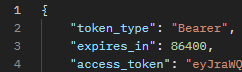
- Refresh your Access Token regularly before calling the API. Note that the token expires in 24 hours (86400 sec.). You can check it in the Get Access Token response:
- Limit queries to active suppliers to optimize response times.
- Use filters or parameters (e.g. article number, brand) to refine results.
- Review returned data structure in API documentation before integration.
- If you expect very large assortments, implement asynchronous processing or batch retrieval using pagination to avoid timeouts.
- If you expect very large assortments, use batch-lookup to avoid timeouts. It allows to search up to 50 articles.
¶ Related Buyer Solutions
Administration TecCom Business Cloud for Buyers
Describes the necessary administration setup for Buyers to use Business Cloud features.
TecCom Business Cloud Export and Subscription API
Describes Buyer APIs for exports, subscriptions and templates.
TecCom Managed Data – Templates
Describes how to create and manage templates for data exports.